Famicom · 1986
Castlevania
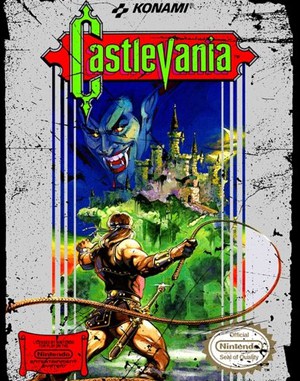
Castlevania combines deliberate whip attacks, sub-weapons and dangerous jumps on Simon Belmont’s route to Dracula.
Famicom · 1986
Castlevania combines deliberate whip attacks, sub-weapons and dangerous jumps on Simon Belmont’s route to Dracula.
Click the button below to launch the Famicom emulator and start playing instantly in your browser.
These are separate games or editions; your saved progress does not transfer.
Browse all playable games →Wait for larger games to download. If loading stalls, reload and try again. Check your connection and allow this site's player files if a browser extension blocked them. Once the screen appears, click inside it before using the keyboard.
Read the playing helpStart the game, then use its on-screen direction pad and action buttons. If they are hidden, choose Show touch controls above the game. Turn your phone sideways for more room; use Fullscreen when your browser supports it.
Touch support varies by emulator and game. You can still expand the keyboard layout below, or connect a compatible keyboard or gamepad.
Control panel
Arrow keys move · Z = controller A · X = controller B · Enter starts · V selects.
A compatible gamepad can be used after launch.
Default Player 1 keys are shown. If you changed them or use a gamepad, check the player’s control settings.
System: Move the pointer over the game screen to reveal the player toolbar, or tap its menu button on touch devices. Use the toolbar for save and load states, fullscreen, and control settings.
Importing replaces the save stored for this game on this browser. Download your current backup first if you want to keep it.
Launch the game to check save-state support.
Save progress keeps one emulator snapshot for this game on this browser. Saving again replaces that snapshot. Download a backup before clearing site data or changing devices. No account or cloud sync is provided.
Import an OLDGAMES backup on this same game page, then launch and choose Resume saved game. Older .state files use the player’s Load State menu.
Favorites bookmark this page; they do not save progress.
In-game saves and emulator states are different. Availability varies by game and player. Browser storage can be cleared; a downloaded backup is not cloud sync.
More about controls and backupsPlayer feedback
Was this classic worth replaying?
Share this game
Share a direct link to this game page.
Castlevania combines deliberate whip attacks, sub-weapons and dangerous jumps on Simon Belmont’s route to Dracula.
Simon’s whip handles nearby enemies, while axes, daggers and other sub-weapons give different attack paths. Hearts fuel sub-weapons rather than restoring health. The committed movement and attack timing make reading a hazard before jumping especially important.
Hearts pay for sub-weapon attacks; they do not refill Simon’s health. Check the heart count before relying on an axe or dagger. The whip also has a delay before it connects, so start the swing while an enemy is approaching its reach.
This is the original linear Castlevania. Simon’s Quest and later exploration-focused entries use different progression systems.
Background and mechanics: Wikipedia game reference.
For the original NES action game. Resource rules follow the Nintendo-hosted instructions; combat practice below is editorial advice, not a full walkthrough.
Understand Castlevania NES hearts, sub-weapons, whip spacing and continue rules, with practical combat exercises and Nintendo instruction references.
Content updated · Editorial policy
| Input | Action |
|---|---|
| A | Jump. |
| B | Use the whip. |
| Up + B | Use the equipped sub-weapon. |
Choose a clear stretch and learn the distance at which a standing whip strike reaches an enemy. Keep that position consistent for a few attempts, then try the same target with a jump.
Before committing to a jump near a hazard, decide where you intend to land. If the enemy is the problem, adjust the attack position; if the landing is the problem, practise the jump separately. Trying to fix both at once makes a failed exchange harder to understand.
References: Castlevania: Nintendo instruction guide
| Resource | Purpose |
|---|---|
| Hearts | Pay for sub-weapon attacks. |
| Pork chop | Restores health. |
| Watch | Costs five hearts to use. |
| Double / Triple Shot | Allows additional sub-weapon shots in succession. |
Read the health bar and heart counter separately before taking a risky route towards a pickup. A heart can support your next attack, but it will not repair health already lost.
When supplies are low, choose which encounter you want the sub-weapon for. Use the whip on a familiar approach and keep the resource for the section where you have a specific plan. Do not spend it only because an enemy is visible.
References: Castlevania: Nintendo instruction guide
The dagger travels forward, the axe follows an arc and holy water burns along the ground. They offer different paths to a target rather than interchangeable extra damage.
Before throwing, look at the enemy’s height and your own position. Test one throw from a safe spot and watch where it actually goes. A miss can tell you to change position rather than throw repeatedly.
Keep notes about positions that work on a difficult approach. Describe the target and direction, not just the name of the weapon. That makes the advice useful when you return without the same equipment.
References: Castlevania: Nintendo instruction guide
After game over, CONTINUE restarts from the beginning of the level; END returns to the title screen. A continue is not an exact replay of the last scene.
Use the repeated approach to practise the section that cost you health before the harder encounter. If you want to preserve a particular practice position, consult the browser player’s separate state controls. These notes do not verify a region-specific cheat sequence or identify the precise file revision.
References: Castlevania: Nintendo instruction guide
Hearts supply sub-weapon ammunition. They are separate from health; a pork chop restores health.
Use Up and B together for the equipped sub-weapon, with enough hearts available.
They affect consecutive sub-weapon shots rather than the whip’s damage.
Practice routines and route-planning suggestions are editorial advice. Mechanics and edition facts are tied to the references below. No exact ROM-region identification or browser save-and-restore playtest is claimed.
Controller actions, hearts versus health, sub-weapon paths and continue rules. Positioning exercises are editorial suggestions.
Continue reading: Browser controls and backup help
The control panel below the game screen shows this edition’s keys. Click inside the game before using your keyboard.
Open the player menu for the options available in this emulator. Save support varies by game and player; see the playing help for more guidance.
Browse Platform games across systems, or stay with the Famicom catalogue. Related picks below explain how each game connects.