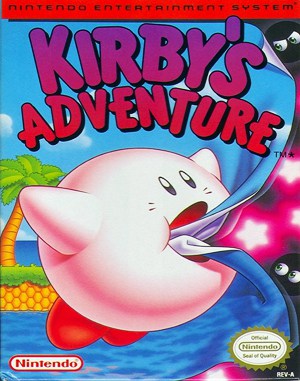
Famicom · 1993
Kirby’s Adventure
Kirby’s Adventure turns swallowed enemies into Copy Abilities, giving the same stage several different approaches.
Famicom · 1993
Kirby’s Adventure turns swallowed enemies into Copy Abilities, giving the same stage several different approaches.
Click the button below to launch the Famicom emulator and start playing instantly in your browser.
These are separate games or editions; your saved progress does not transfer.
Browse all playable games →Wait for larger games to download. If loading stalls, reload and try again. Check your connection and allow this site's player files if a browser extension blocked them. Once the screen appears, click inside it before using the keyboard.
Read the playing helpStart the game, then use its on-screen direction pad and action buttons. If they are hidden, choose Show touch controls above the game. Turn your phone sideways for more room; use Fullscreen when your browser supports it.
Touch support varies by emulator and game. You can still expand the keyboard layout below, or connect a compatible keyboard or gamepad.
Control panel
Arrow keys move · Z = controller A · X = controller B · Enter starts · V selects.
A compatible gamepad can be used after launch.
Default Player 1 keys are shown. If you changed them or use a gamepad, check the player’s control settings.
System: Move the pointer over the game screen to reveal the player toolbar, or tap its menu button on touch devices. Use the toolbar for save and load states, fullscreen, and control settings.
Importing replaces the save stored for this game on this browser. Download your current backup first if you want to keep it.
Launch the game to check save-state support.
Save progress keeps one emulator snapshot for this game on this browser. Saving again replaces that snapshot. Download a backup before clearing site data or changing devices. No account or cloud sync is provided.
Import an OLDGAMES backup on this same game page, then launch and choose Resume saved game. Older .state files use the player’s Load State menu.
Favorites bookmark this page; they do not save progress.
In-game saves and emulator states are different. Availability varies by game and player. Browser storage can be cleared; a downloaded backup is not cloud sync.
More about controls and backupsPlayer feedback
Was this classic worth replaying?
Share this game
Share a direct link to this game page.
Kirby’s Adventure turns swallowed enemies into Copy Abilities, giving the same stage several different approaches.
Kirby can inhale enemies, float over obstacles and copy certain powers. Abilities change how you attack and interact with parts of a stage, so experimentation becomes a central attraction. Hub areas connect the levels, bosses and smaller activities.
Floating and using a Copy Ability are separate actions. While inflated, Kirby cannot use the copied attack; exhaling ends the flight. Land where you have room to attack if you need a power to clear the next obstruction.
This page covers the Famicom/NES game, not the Game Boy Advance remake Nightmare in Dream Land.
Background and mechanics: Wikipedia game reference.
For the NES adventure. Nintendo’s instructions support the ability and save rules; the learning routine is editorial advice.
Learn Kirby’s Adventure inhale and copy controls, ability recovery, floating and what the game saves, with Nintendo manual references.
Published by OLDGAMES · Content updated · Editorial policy · Report a correction
| Input / state | Action |
|---|---|
| B without an ability | Inhale an enemy. |
| Down after inhaling | Swallow; copy an ability when the enemy has one. |
| B after inhaling | Spit the enemy as a star. |
| Select | Discard the current ability. |
Practise the sequence with one nearby enemy before using it in a crowded section. First decide whether you want a projectile or a copied ability, then press the button for that outcome.
After each attempt, check Kirby’s state before repeating the input. If the result is different from what you expected, identify whether Kirby was empty, holding an enemy or already using an ability. This is easier to diagnose than pressing B repeatedly without checking.
References: Kirby’s Adventure: Nintendo instruction guide
An active ability prevents normal inhaling until it is discarded. A released ability star can be inhaled and swallowed to recover the ability.
When you lose an ability, look at the surrounding hazards before chasing the star. Choose a clear approach and check that there is space to use the inhale action. Recovery is less useful if the chase costs another hit.
Before an unfamiliar obstacle, ask what your current ability helps you do. If you need to experiment with another one, pick a safe place to discard the first. Keep a note about the obstacle you solved rather than treating every new ability as an upgrade.
References: Kirby’s Adventure: Nintendo instruction guide
Up inflates Kirby; A supports floating movement. B expels an air pellet and deflates him. A quick double tap in a direction starts running.
Use a short gap to practise rising, moving across and landing on a chosen platform. Keep the landing visible while you travel. Before deflating, check what is directly below instead of treating flight as a reason to stop watching the floor.
For a repeated failure, practise only the troublesome part of the crossing. Start with a clear landing, then add the enemy or pickup that made the original route difficult.
References: Kirby’s Adventure: Nintendo instruction guide
The game saves when leaving a stage. That saved progress does not preserve current lives, health, ability or score.
Write down the stage you completed before ending a session. If you need the precise running position and equipment, use a separate emulator backup and check that it loads before replacing your older copy. The game’s save feature does not establish that browser storage will survive clearing site data, nor does it provide cloud sync.
References: Kirby’s Adventure: Nintendo instruction guide
After inhaling, Down swallows and can copy an ability. B spits the enemy as a star.
An active ability replaces normal inhaling. Select discards it so you can inhale again.
The game’s saved progress excludes the current ability, lives, health and score.
Practice routines and route-planning suggestions are editorial advice. Mechanics and edition facts are tied to the references below. No exact ROM-region identification or browser save-and-restore playtest is claimed.
Inhale/copy inputs, ability recovery, floating and the limits of the game’s save feature. Practice and backup routines are editorial advice.
Continue reading: Browser controls and backup help
The control panel below the game screen shows this edition’s keys. Click inside the game before using your keyboard.
Open the player menu for the options available in this emulator. Save support varies by game and player; see the playing help for more guidance.
Browse Platform games across systems, or stay with the Famicom catalogue. Related picks below explain how each game connects.