Famicom · 1990
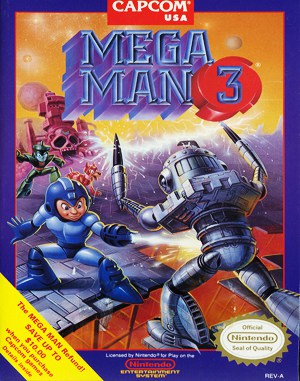
Mega Man 3
Mega Man 3 introduced the slide mechanic and Rush the robotic canine companion across sprawling sci-fi stages.
Famicom · 1990
Mega Man 3 introduced the slide mechanic and Rush the robotic canine companion across sprawling sci-fi stages.
Click the button below to launch the Famicom emulator and start playing instantly in your browser.
These are separate games or editions; your saved progress does not transfer.
Browse all playable games →Wait for larger games to download. If loading stalls, reload and try again. Check your connection and allow this site's player files if a browser extension blocked them. Once the screen appears, click inside it before using the keyboard.
Read the playing helpStart the game, then use its on-screen direction pad and action buttons. If they are hidden, choose Show touch controls above the game. Turn your phone sideways for more room; use Fullscreen when your browser supports it.
Touch support varies by emulator and game. You can still expand the keyboard layout below, or connect a compatible keyboard or gamepad.
Control panel
Arrow keys move · Z = controller A · X = controller B · Enter starts · V selects.
A compatible gamepad can be used after launch.
Default Player 1 keys are shown. If you changed them or use a gamepad, check the player’s control settings.
System: Move the pointer over the game screen to reveal the player toolbar, or tap its menu button on touch devices. Use the toolbar for save and load states, fullscreen, and control settings.
Importing replaces the save stored for this game on this browser. Download your current backup first if you want to keep it.
Launch the game to check save-state support.
Save progress keeps one emulator snapshot for this game on this browser. Saving again replaces that snapshot. Download a backup before clearing site data or changing devices. No account or cloud sync is provided.
Import an OLDGAMES backup on this same game page, then launch and choose Resume saved game. Older .state files use the player’s Load State menu.
Favorites bookmark this page; they do not save progress.
In-game saves and emulator states are different. Availability varies by game and player. Browser storage can be cleared; a downloaded backup is not cloud sync.
More about controls and backupsPlayer feedback
Was this classic worth replaying?
Share this game
Share a direct link to this game page.
Mega Man 3 introduced the slide mechanic and Rush the robotic canine companion across sprawling sci-fi stages.
Features eight new Robot Masters followed by four grueling Doc Robot rematch stages revisiting Mega Man 2 bosses. Introduces sliding to squeeze through narrow crevices and dodge projectiles, along with Rush Coil, Rush Jet, and Rush Marine transportation adapters.
Doc Robot stages are the true test of endurance. Reserve Shadow Blade and Needle Cannon energy; their versatile trajectories are critical for surviving the giant robot encounters.
This is the 8-bit NES classic introducing Proto Man (Break Man) and the faithful hound Rush.
Background and mechanics: Wikipedia game reference.
Check the edition and timing requirements before entering a code. Button names refer to the emulated controller; use your assigned keyboard or controller inputs.
Hold Right on Controller 2 while pressing A on Controller 1Holding Right on Controller 2 enables Mega Man to jump twice as high, easily clearing entire screens and obstacles.
Hold Up on Controller 2 during gameplaySlows down the engine frame rate, granting precision timing for difficult platforming and bullet hell patterns.
Hold Right on Controller 2 and jump into any bottomless pitMega Man falls into the pit and loses all health, but does not perish. Climb back out to enjoy infinite health against all enemy attacks.
The control panel below the game screen shows this edition’s keys. Click inside the game before using your keyboard.
Open the player menu for the options available in this emulator. Save support varies by game and player; see the playing help for more guidance.
Browse Platform games across systems, or stay with the Famicom catalogue. Related picks below explain how each game connects.