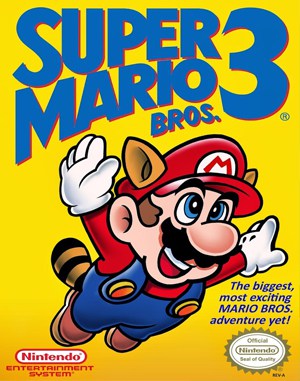
Famicom · 1990
Super Mario Bros. 3
Super Mario Bros. 3 adds world maps, stored items and suits that change how Mario crosses each stage.
Famicom · 1990
Super Mario Bros. 3 adds world maps, stored items and suits that change how Mario crosses each stage.
Click the button below to launch the Famicom emulator and start playing instantly in your browser.
These are separate games or editions; your saved progress does not transfer.
Browse all playable games →Wait for larger games to download. If loading stalls, reload and try again. Check your connection and allow this site's player files if a browser extension blocked them. Once the screen appears, click inside it before using the keyboard.
Read the playing helpStart the game, then use its on-screen direction pad and action buttons. If they are hidden, choose Show touch controls above the game. Turn your phone sideways for more room; use Fullscreen when your browser supports it.
Touch support varies by emulator and game. You can still expand the keyboard layout below, or connect a compatible keyboard or gamepad.
Control panel
Arrow keys move · Z = controller A · X = controller B · Enter starts · V selects.
A compatible gamepad can be used after launch.
Default Player 1 keys are shown. If you changed them or use a gamepad, check the player’s control settings.
System: Move the pointer over the game screen to reveal the player toolbar, or tap its menu button on touch devices. Use the toolbar for save and load states, fullscreen, and control settings.
Importing replaces the save stored for this game on this browser. Download your current backup first if you want to keep it.
Launch the game to check save-state support.
Save progress keeps one emulator snapshot for this game on this browser. Saving again replaces that snapshot. Download a backup before clearing site data or changing devices. No account or cloud sync is provided.
Import an OLDGAMES backup on this same game page, then launch and choose Resume saved game. Older .state files use the player’s Load State menu.
Favorites bookmark this page; they do not save progress.
In-game saves and emulator states are different. Availability varies by game and player. Browser storage can be cleared; a downloaded backup is not cloud sync.
More about controls and backupsPlayer feedback
Was this classic worth replaying?
Share this game
Share a direct link to this game page.
Super Mario Bros. 3 adds world maps, stored items and suits that change how Mario crosses each stage.
A world map connects short levels, fortresses and bonus stops. Power-ups such as the Super Leaf open new movement choices, while collected items can be used between stages. Choosing a route and deciding when to spend an item become part of the platforming challenge.
With the Super Leaf, use a clear stretch to build running speed before trying to fly. The map inventory also lets you enter a stage with a power-up already chosen. Spend it when you know what the next level asks of you.
This is the 8-bit sequel to Super Mario Bros. Later remakes can change saving and add content, so check the platform when following a guide.
Background and mechanics: Wikipedia game reference.
For the Famicom/NES game. These notes use the English Nintendo instructions and do not identify this browser file’s region.
Understand Super Mario Bros. 3 flight controls, shell carrying and world-map items, with practical exercises and Nintendo instruction references.
Published by OLDGAMES · Content updated · Editorial policy · Report a correction
| Input | Action |
|---|---|
| Hold A | Jump higher than a short tap. |
| Hold B while moving | Run. |
| Hold B beside a shell | Pick it up; release B to kick it. |
Choose one platform edge and compare a short tap with a longer press before adding a running approach. A jump that clears the obstacle but lands badly still needs work; use the landing position as your measure.
Practise carrying a shell in an open area. Stop, face the direction you want and release it deliberately. Once that sequence feels predictable, try carrying it through a short section rather than learning it for the first time beside a drop.
References: Super Mario Bros. 3: Nintendo instruction guide
Think of the attempt in three parts: the runway, the climb and the landing. Check that your chosen runway is clear before committing to it, then decide where you want to land instead of flying until the attempt becomes difficult to recover.
If flight does not start, look at the suit and meter first. If it starts but ends badly, practise the descent separately. Changing one part at a time makes it easier to distinguish a charging problem from a landing problem.
References: Super Mario Bros. 3: Nintendo instruction guide
On the world map, B opens the item inventory. Select an item with the direction pad and use A to activate it. The map inventory is different from a power-up already active in a stage.
Before spending an item, name the problem it should solve: a flight section you want to practise, a difficult approach or a route you already understand. Using something valuable before an unfamiliar stage gives you little information about whether it helped.
After a failed attempt, return to that question. Was the problem the power-up choice, the approach or the timing? Keep a successful route in your notes so that your next map decision has a reason behind it.
References: Super Mario Bros. 3: Nintendo instruction guide
Raccoon Mario and Tanooki Mario both support flight, but Tanooki also has a statue action using Down and B. Do not assume every suit shares every action.
This page follows the NES/Famicom mechanics. Later versions may have additional features. Keep the keyboard mapping visible while practising, especially when a move requires holding B and tapping A separately.
References: Super Mario Bros. 3: Nintendo instruction guide
Run until the power meter shows a flashing P, then tap A to begin flight.
Release B to kick the shell. Face the intended direction before releasing it.
Open the world-map inventory with B, choose an item and press A to use it.
Practice routines and route-planning suggestions are editorial advice. Mechanics and edition facts are tied to the references below. No exact ROM-region identification or browser save-and-restore playtest is claimed.
Jump height, shell carrying, flight meter, suit actions and world-map inventory. Route-planning suggestions are editorial advice.
Continue reading: Original Super Mario Bros.: running and landing practice
The control panel below the game screen shows this edition’s keys. Click inside the game before using your keyboard.
Open the player menu for the options available in this emulator. Save support varies by game and player; see the playing help for more guidance.
Browse Platform games across systems, or stay with the Famicom catalogue. Related picks below explain how each game connects.
 YEAR1990
Famicom
Platform 1 Player
Platform gameplay · Famicom
 YEAR1990
Famicom
Platform 1 Player
Platform gameplay · Famicom
 YEAR1990
Famicom
Platform 1 Player
Platform gameplay · Famicom
 YEAR1989
Famicom
Platform 1 Player
Platform gameplay · Famicom