Famicom · 1983
Donkey Kong
Donkey Kong turns ladders, rolling barrels and short jumps into compact, repeatable climbing challenges.
Famicom · 1983
Donkey Kong turns ladders, rolling barrels and short jumps into compact, repeatable climbing challenges.
Click the button below to launch the Famicom emulator and start playing instantly in your browser.
These are separate games or editions; your saved progress does not transfer.
Browse all playable games →Wait for larger games to download. If loading stalls, reload and try again. Check your connection and allow this site's player files if a browser extension blocked them. Once the screen appears, click inside it before using the keyboard.
Read the playing helpStart the game, then use its on-screen direction pad and action buttons. If they are hidden, choose Show touch controls above the game. Turn your phone sideways for more room; use Fullscreen when your browser supports it.
Touch support varies by emulator and game. You can still expand the keyboard layout below, or connect a compatible keyboard or gamepad.
Control panel
Arrow keys move · Z = controller A · X = controller B · Enter starts · V selects.
A compatible gamepad can be used after launch.
Default Player 1 keys are shown. If you changed them or use a gamepad, check the player’s control settings.
System: Move the pointer over the game screen to reveal the player toolbar, or tap its menu button on touch devices. Use the toolbar for save and load states, fullscreen, and control settings.
Importing replaces the save stored for this game on this browser. Download your current backup first if you want to keep it.
Launch the game to check save-state support.
Save progress keeps one emulator snapshot for this game on this browser. Saving again replaces that snapshot. Download a backup before clearing site data or changing devices. No account or cloud sync is provided.
Import an OLDGAMES backup on this same game page, then launch and choose Resume saved game. Older .state files use the player’s Load State menu.
Favorites bookmark this page; they do not save progress.
In-game saves and emulator states are different. Availability varies by game and player. Browser storage can be cleared; a downloaded backup is not cloud sync.
More about controls and backupsPlayer feedback
Was this classic worth replaying?
Share this game
Share a direct link to this game page.
Donkey Kong turns ladders, rolling barrels and short jumps into compact, repeatable climbing challenges.
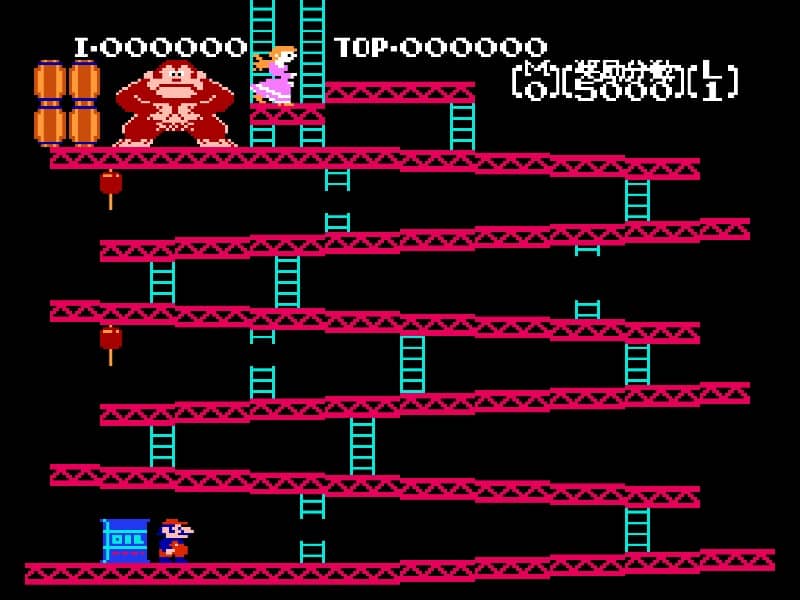
Mario climbs toward Pauline while hazards move through a single-screen layout. Timing matters more than a large move set: each ladder and jump changes your exposure to the next barrel or enemy. A hammer offers temporary protection but also changes your movement options.
The hammer changes your route as well as your attack: carrying it prevents jumping and ladder climbing. Pick it up when you want to clear hazards on the current platform, not just before a ladder you need to use.
This Famicom/NES port omits the arcade conveyor-belt screen. Donkey Kong Jr. swaps the rescue roles and builds its routes around vines.
Background and mechanics: Wikipedia game reference.
For the three-round NES version. The original booklet and Nintendo instruction guide support the goals and hazards; route practice is editorial advice.
Learn Donkey Kong NES round objectives, ladder hazards, difficulty selection and bonus timing, with practical route advice and Nintendo manuals.
Content updated · Editorial policy
| Round | Goal |
|---|---|
| I and II | Reach Pauline at the top. |
| III | Remove the bolts by walking over them. |
| Game A / Game B | Select the normal or harder difficulty. |
Start with Game A while learning how the round works. Before the first climb, trace the route upwards and choose the next safe place to stop. Focus on that part of the route rather than trying to predict the entire screen at once.
In the bolt round, keep track of what remains. If you lose an attempt, note the unfinished part so that you can reconsider your crossing order instead of automatically repeating the same path.
References: Donkey Kong: Nintendo instruction guide · Donkey Kong: original NES booklet
Mario cannot jump onto or off a ladder, and a long fall can cost a life. A ladder is therefore a route commitment rather than a place to improvise a jumping escape.
Look at the platform you will arrive on before starting a climb. If an approaching hazard makes the exit difficult, reassess from a clear position rather than depending on a jump during the climb.
Practise one crossing until you can identify where it becomes unsafe. Then add the next ladder. A useful note names the platform and exit; “be careful of barrels” gives you much less help on the next attempt.
References: Donkey Kong: original NES booklet
The bonus counts down as the round continues. Reaching zero costs a life. A hammer temporarily destroys enemies, and optional objects add points.
Wait with a specific purpose: to see a hazard pass or to choose a clear crossing. If you are waiting without knowing what would make the route safe, study a shorter section on the next attempt.
Treat optional points as a separate goal while learning. First make the route understandable, then decide where an extra pickup fits without forcing an awkward return. Note whether a failed attempt came from enemy contact, a fall or running out of time; each calls for a different adjustment.
References: Donkey Kong: Nintendo instruction guide
This guide covers the three rounds in the NES instructions. An arcade walkthrough may describe a different screen sequence; match its screenshots and goals before applying it here.
Donkey Kong Jr. has vine movement and a different rescue objective. Do not carry this ladder routine across without checking that game’s controls. Browser keys should be read from the control panel; A and B here are controller labels, not assumed keyboard letters.
References: Donkey Kong: Nintendo instruction guide · Donkey Kong: original NES booklet
Game B is the harder difficulty; Game A is the starting choice for learning the rounds.
The bonus countdown reaching zero costs a life. Waiting indefinitely is not a safe route.
Walk over the bolts to remove them, rather than only climbing to the top.
Practice routines and route-planning suggestions are editorial advice. Mechanics and edition facts are tied to the references below. No exact ROM-region identification or browser save-and-restore playtest is claimed.
Three-round objectives, difficulty, hammer, bonus clock and scoring objects.
Original instructions for ladder and fall hazards, menu options and round goals.
Continue reading: Donkey Kong Jr.: vine routes and key round
The control panel below the game screen shows this edition’s keys. Click inside the game before using your keyboard.
Open the player menu for the options available in this emulator. Save support varies by game and player; see the playing help for more guidance.
Browse Action games across systems, or stay with the Famicom catalogue. Related picks below explain how each game connects.