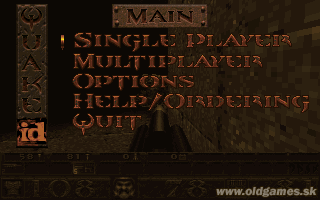
DOS · 1996
Quake
Quake combines fully 3D levels, vertical combat and projectile weapons across a sequence of dark single-player episodes.
DOS · 1996
Quake combines fully 3D levels, vertical combat and projectile weapons across a sequence of dark single-player episodes.
Click the button below to launch the DOS emulator and start playing instantly in your browser.
These are separate games or editions; your saved progress does not transfer.
Browse all playable games →Wait for larger games to download. If loading stalls, reload and try again. Check your connection and allow this site's player files if a browser extension blocked them. Once the screen appears, click inside it before using the keyboard.
Read the playing helpDOS controls vary by game. Use the player’s input menu for a virtual keyboard or mouse when available. A hardware keyboard is recommended for games with many keys.
Touch support varies by emulator and game. You can still expand the keyboard layout below, or connect a compatible keyboard or gamepad.
Control panel
Keyboard and mouse — this title uses its archived JS-DOS configuration.
A compatible gamepad can be used after launch.
The archived source configuration selects the game launcher and DOSBox settings. Game keys still vary by title; check its title screen or in-game help.
System: Use the JS-DOS player menu for fullscreen and input options. The source package remains the authority for title-specific keys.
Favorites bookmark this page; they do not save progress.
Use the game’s own Save/Load menu when available. JS-DOS save options depend on this package; check its player menu and game instructions.
In-game saves and emulator states are different. Availability varies by game and player. Browser storage can be cleared; a downloaded backup is not cloud sync.
More about controls and backupsPlayer feedback
Was this classic worth replaying?
Share this game
Share a direct link to this game page.
Quake combines fully 3D levels, vertical combat and projectile weapons across a sequence of dark single-player episodes.
Enemies and platforms occupy space above and below you, making elevation a major change from earlier corridor shooters. Weapons such as the grenade launcher and rocket launcher reward an understanding of trajectories and splash damage. Keys and switches still guide exploration.
Grenades and rockets can hurt you with their explosions. Leave space around a nearby wall or enemy before firing, and check above you when shots seem to arrive from an empty corridor. Quake’s rooms have threats at different heights.
This is the DOS-era Quake. Doom II is another first-person game in the library, but its maps and movement make a different comparison from a modern Quake source port.
Background and mechanics: Wikipedia game reference.
Check the edition and timing requirements before entering a code. Button names refer to the emulated controller; use your assigned keyboard or controller inputs.
Press ~ then type godPress the tilde key (~) to bring down the Quake developer console and enter "god" to toggle complete invulnerability against all demon attacks, lava, and drowning.
Press ~ then type give allConsole command granting all single-player weapons (Thunderbolt, Rocket Launcher, Grenade Launcher, Super Nailgun) along with maximum ammunition reserves and 100 armor.
Press ~ then type noclipAllows free-flight navigation through solid walls, sealed portals, and ceiling structures across all dark Gothic dimensions.
The control panel below the game screen shows this edition’s keys. Click inside the game before using your keyboard.
Open the player menu for the options available in this emulator. Save support varies by game and player; see the playing help for more guidance.
Browse First Person Shooter games across systems, or stay with the DOS catalogue. Related picks below explain how each game connects.
 YEAR1995
DOS
First Person Shooter 1 Player
First-person shooter gameplay · DOS
 YEAR1995
DOS
First Person Shooter 1 Player
First-person shooter gameplay · DOS
 YEAR1994
DOS
First Person Shooter 1 Player
First-person shooter gameplay · DOS
 YEAR1992
DOS
First Person Shooter 1 Player
First-person shooter gameplay · DOS