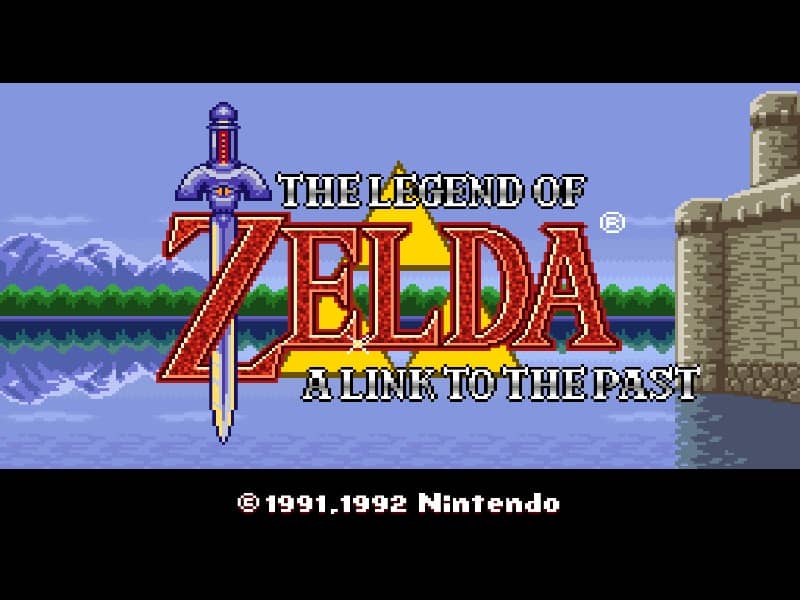
Super Famicom · 1991
The Legend of Zelda: A Link To The Past
The Legend of Zelda: A Link to the Past establishes the modern adventure blueprint with dual parallel worlds, tight dungeon puzzles, and multi-directional sword combat.
Super Famicom · 1991
The Legend of Zelda: A Link to the Past establishes the modern adventure blueprint with dual parallel worlds, tight dungeon puzzles, and multi-directional sword combat.
Click the button below to launch the Super Famicom emulator and start playing instantly in your browser.
These are separate games or editions; your saved progress does not transfer.
Browse all playable games →Wait for larger games to download. If loading stalls, reload and try again. Check your connection and allow this site's player files if a browser extension blocked them. Once the screen appears, click inside it before using the keyboard.
Read the playing helpStart the game, then use its on-screen direction pad and action buttons. If they are hidden, choose Show touch controls above the game. Turn your phone sideways for more room; use Fullscreen when your browser supports it.
Touch support varies by emulator and game. You can still expand the keyboard layout below, or connect a compatible keyboard or gamepad.
Control panel
Arrow keys move · Z = controller A · X = controller B · Enter starts · V selects.
A compatible gamepad can be used after launch.
Default Player 1 keys are shown. If you changed them or use a gamepad, check the player’s control settings.
System: Move the pointer over the game screen to reveal the player toolbar, or tap its menu button on touch devices. Use the toolbar for save and load states, fullscreen, and control settings.
Importing replaces the save stored for this game on this browser. Download your current backup first if you want to keep it.
Launch the game to check save-state support.
Save progress keeps one emulator snapshot for this game on this browser. Saving again replaces that snapshot. Download a backup before clearing site data or changing devices. No account or cloud sync is provided.
Import an OLDGAMES backup on this same game page, then launch and choose Resume saved game. Older .state files use the player’s Load State menu.
Favorites bookmark this page; they do not save progress.
In-game saves and emulator states are different. Availability varies by game and player. Browser storage can be cleared; a downloaded backup is not cloud sync.
More about controls and backupsPlayer feedback
Was this classic worth replaying?
Share this game
Share a direct link to this game page.
The Legend of Zelda: A Link to the Past establishes the modern adventure blueprint with dual parallel worlds, tight dungeon puzzles, and multi-directional sword combat.
Link navigates Hyrule and the corrupted Dark World using the Magic Mirror to warp between parallel dimensions. Combat expands from simple stabs to full-arc sword slashes, charge-release spin attacks, and ranged sub-weapons including the Boomerang, Bow, and Hookshot. Dungeons combine multi-floor spatial navigation with puzzle mechanics: pushing blocks, striking crystal switches to lower colored barriers, and lighting torches to reveal concealed passageways before confronting multi-phase labyrinth bosses.
Acquiring the Pegasus Boots from Sahasrahla after clearing the Eastern Palace transforms exploration. Dashing into trees, gravestones, and bookshelf walls dislodges hidden fairies, bombs, and collectible items like the Book of Mudora. In the Dark World, ensure you have the Moon Pearl from the Tower of Hera; without it, Link is reduced to a defenseless bunny form incapable of drawing weapons or using magic.
This is the Super Famicom / SNES release. Unlike the first Legend of Zelda on NES, this game introduces multi-layer vertical elevation, the Master Sword questline, and interconnected dimensional puzzles.
Background and mechanics: Wikipedia game reference.
Shigeru Miyamoto and Nintendo A Link to the Past interview archives · Documents the creation of the Light World and Dark World dichotomy.
Check the edition and timing requirements before entering a code. Button names refer to the emulated controller; use your assigned keyboard or controller inputs.
Pegasus Dash south from Sanctuary entranceStart at the Sanctuary, dash south into the screen transition at full speed toward Hyrule Castle: if done rapidly before CPU load settles, falling down the hole drops Link into the legendary secret room with 45 blue rupees (225 rupees) and the developer tribute telepathic tile.
Toss Boomerang & Shield into WaterfallVisit the Waterfall of Wishing northeast of Zora’s Domain. Toss your standard Boomerang into the pool to receive the Magical Boomerang, and toss your standard Fighter’s Shield to receive the Red Fire Shield.
Sprinkle Magic Powder on Anti-FaeriesUsing Magic Powder on bouncing skulls or fireball Anti-Faeries in dungeons instantly transforms them into standard full-healing Faeries.
The control panel below the game screen shows this edition’s keys. Click inside the game before using your keyboard.
Open the player menu for the options available in this emulator. Save support varies by game and player; see the playing help for more guidance.
Browse Adventure games across systems, or stay with the Super Famicom catalogue. Related picks below explain how each game connects.
 YEAR1986
Famicom
Adventure 1 Player
Action-adventure gameplay · Famicom
 YEAR1991
Famicom
Adventure 1 Player
Action-adventure gameplay · Famicom
 YEAR1991
Famicom
Adventure 1 Player
Action-adventure gameplay · Famicom
 YEAR1990
Famicom
Action 1 Player
Action-adventure gameplay · Famicom